| Status | Date | Doc Version | Applicable | Confidentiality |
RELEASED | v1.1 | NMS v1.3.0 | PUBLIC |
This document is intended specifically for readers who are already familiar with Wirepas Mesh[1]. It assumes that the audience has prior knowledge and understanding of Wirepas positioning documentation, and is comfortable navigating technical content related to these topics
Introduction
Wirepas has officially announced the end of support for two of its key products: the Wirepas Network Tool (WNT) and the Wirepas Positioning Engine (WPE). For more comprehensive information and specific details regarding this end-of-support (EOS) notification, please refer to the official EOS notification document[2].
WNT will be replaced with a modern, scalable Network Management System (NMS)[3] that incorporates advanced components designed to ensure long-term maintainability and strict regulatory compliance. NMS features a robust backend, a user-friendly web-based interface, and comprehensive RESTful APIs, providing powerful and flexible capabilities. It becomes a key backend element of the Wirepas offering, providing essential services for operating and managing Wirepas Mesh networks.
Although NMS does not have a positioning engine feature, it will continue to deliver unprocessed positioning mesh measurement data (RSSI values) from tags and anchors through the MQTT broker like any other mesh data.
This application note guides the development of a positioning system using mesh measurement data. It does not provide a fully functional positioning engine; any code examples in this document serve only as samples.
NMS Overview
Complete NMS documentations and features exceed this document's scope. However, comprehensive NMS documentation—including the user interface[4], backend systems[5], and APIs[6]—is available on the Wirepas Developer Portal. This section briefly outlines related NMS capabilities to support understanding of later sections.
NMS UI Map
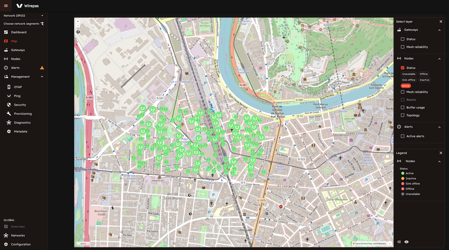
Indoor positioning and components such as custom building and floor maps are not included as part of the Wirepas Network Management System (NMS). However, the NMS does feature a modern world map page that is capable of rendering WGS84 geographical coordinates for various network elements including tags, anchors, and gateways. These locations are incorporated into the NMS through the use of the NMS user interface (UI) metadata management pages or alternatively via Backend APIs. The map displayed in the NMS UI not only shows the mesh network components on world map but also generates topology diagrams and provides valuable metrics to users.
NMS Backend APIs
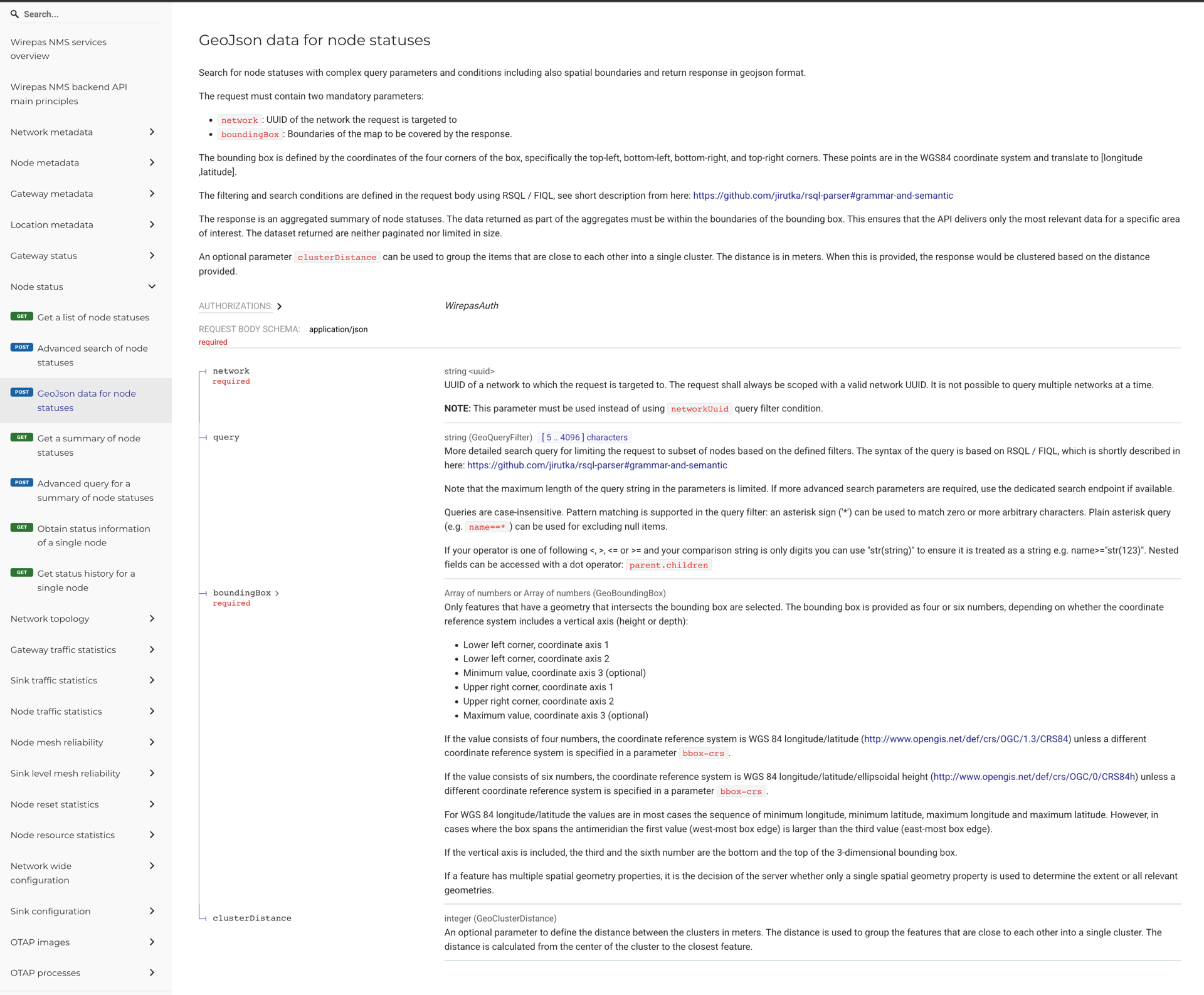
Rich RESTful APIs [6] provide users and applications with powerful capabilities to manipulate and consume data stored within the NMS database. These APIs enable a wide range of actions to be performed directly on the mesh network, facilitating seamless integration and control.
The Metadata, Status, Statistics, Configuration, and OTAP APIs collectively form a crucial backbone for customer applications that can leverage Wirepas mesh networks. These APIs offer essential functionalities that support efficient network management and operational tasks.
MQTT Broker
NMS includes its own stable MQTT broker. Positioning measurement data from endpoint 238/238 in mesh networks is user application data in Wirepas Mesh terms[7]. Depending on the gateway transport service[8] configuration or MQTT bridging implementation, positioning data from endpoint 238/238 should be consumed from the MQTT broker (either the NMS broker or another) that collects the application data.
NMS and WNT+WPE Comparison for Positioning
Manual geo location coordinates update and no positioning engine
NMS stores geo-location coordinates and custom user-defined locations like state, city, and towns for tags, anchors, sinks, gateways, and networks. WGS84 coordinates of nodes (tags, anchors) and gateways can be set and updated via the NMS UI and RESTful APIs.
Since NMS does not have a positioning engine feature, it will not update tag locations automatically.
Only WGS84 coordinates support
NMS Map supports only the world map and WGS84 coordinates. Users can create custom location[9] hierarchies such as city, town, and street, and assign tags and anchors to these locations.
NMS cannot store building and floor maps, pixel coordinates, and does not have feature of their conversions to WGS84.
Custom field for user specific data store to node(tag, anchor), gateway and network metadata
NMS does not include Wirepas positioning metadata in its APIs. For example, NMS node metadata is not designed to have positioning roles like tag or anchor. Depending on the positioning system design, an external database can be used alongside NMS for positioning.
For this reason, NMS Metadata APIs (Network, Node, Gateway, Location) provide a "custom" field to store customer-specific information in JSON format, saved as JSONB in the database like standard NMS fields such as uuid, name, and address. Hence "tag" or "anchor," these can be stored in the "custom" field. This field also holds user-specific information and can be accessed and filtered via NMS APIs.
Example “custom“ field of Node Metadata for this usage can be: {“positioning_role“: “TAG“} or {“is_anchor“: false}.
How To Get Positioning Measurements
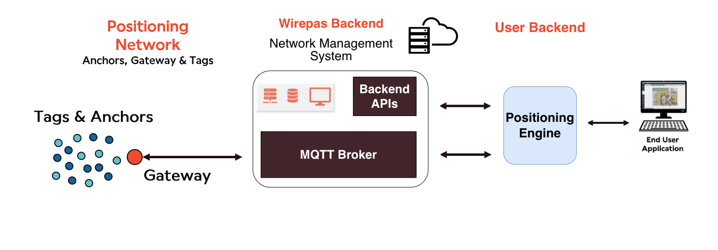
NMS will continue to deliver positioning measurements data coming from mesh network through gateways into MQTT broker. Positioning measurements are published through 238/238 endpoint, therefore corresponding MQTT broker collecting application data should be subscribed.
Measurement message is a typical application data payload embedded in the usual GenericMessage.PacketReceivedEvent protobuf message[10] as part of gateway_to_backend APIs. Examples of decoding a Wirepas GenericMessage protobuf into Python are available in the wirepas-mesh-messaging-python[11] repository.
# TOPIC:
# gw-event/received_data/<gw-id>/<sink-id>/<net_id>/238/238

# Decoded PacketReceivedEvent Protobuf message, with measurements data payload,
#   consumed from 238/238 endpoint
wirepas {
  packet_received_event {
    header {
      gw_id: "nuc258"
      sink_id: "sink0"
      event_id: 5693349
      time_ms_epoch: 1767692729624
    }
    source_address: 10482121
    destination_address: 102
    source_endpoint: 238
    destination_endpoint: 238
    travel_time_ms: 0
    rx_time_ms_epoch: 1767692729624
    qos: 0
    payload: <Measurement Message Payload Bytes in TLV format>
    hop_count: 1
    network_address: 3806491
  }
}
Parsing positioning measurement message payload bytes is well documented in the Wirepas Positioning Application Reference Manual, version 1.5 [12]. Its structure is little-endian with multiple conditional TLV payloads.
How To Estimate Location Using Incoming Measurements
After decoding the PacketReceivedEvent protobuf message[10] and parsing the payload per Positioning documentation[12], measurements and additional information can appear as the example JSON below, depending on parameters and positioning component type (tag/anchor):
{
    "measurements": [
        {"type": 0, "target": 201085, "rssi": -85.0},
        {"type": 0, "target": 11847833, "rssi": -90.0},
        {"type": 0, "target": 10713019, "rssi": -74.0},
        {"type": 0, "target": 11501106, "rssi": -75.0}
    ],
    "sequence": 18101,
    "source_address": 20360007,
    "voltage": 3.353,
    "tag_operation_info": {
        "features": {
            "ble_eddystone": 0,
            "ble_ibeacon": 0,
            "is_static": 0,
            "mini_beacons": 0,
            "motion": 0,
            "version": 1
        },
        "length": 10,
        "node_class": 254,
        "node_mode": "<DIRECTED_ADVERTISER_TAG or 5>",
        "type": 6,
        "update_time_s": 60
    }
}
Measurements records[13] are target anchor node addresses and their RSSI values collected by the source node (usually a tag, but sometimes an anchor). Source node's (tag's) current location can be estimated using these RSSI values and the known locations of target anchors.
Anchor locations, essential for positioning estimation, can be stored in the Network Management System (NMS) or another reliable source. Since the positioning estimator requires them regularly, caching these locations reduces overhead from repeated RESTful API requests or DB calls and improves system performance.
# example anchor locations from the above source node's network
201085: {"lat": 61.4465954508528, "lon": 23.862305482572, "alt": -5.70528209209442e-06}
11847833: {"lat": 61.4466544174953, "lon": 23.8624366993995, "alt": 3.89106571674347e-06}
10713019: {"lat": 61.4467832905364, "lon": 23.8622590356, "alt": 7.17369839549065e-05}
11501106: {"lat": 61.4468227302089, "lon": 23.8623769152553, "alt": 8.73859971761703e-05}
Wirepas includes example location estimation code in the “core” folder. It contains the main C file “ckernel.c” for calculations, its “Makefile”, and the Python binding “kernel.py” for Python applications. Needless to say, C applications may directly use ckernel.c “locate“ method and do not need Python bindings.
After compiling ckernel.c with make, it can be importable into Python through kernel.py. The function estimate_location(self, anchors, measurements) estimates the source node's geolocation. The first argument, “anchors”, expects a list of anchor coordinates list defined as [latitude, longitude, altitude] in this exact order. The second argument, “measurements,” should be a list of float RSSI values. The index of an anchor's lat/lon/alt in “anchors” matches its RSSI value's index in “measurements.” For example, the first value in “anchors” (61.4465954508528, 23.862305482572, -5.70528209209442e-06) corresponds to the anchor with address “201085,” and its RSSI value “-85.0” is the first value in “measurements.”
# example estimate_location usage,
# anchor locations and RSSI measurement values lists should be in respective order
from core.kernel import Kernel

kernel = Kernel(logging.getLogger(__name__))
kernel.estimate_location(
    anchors=[
        (61.4465954508528, 23.862305482572, -5.70528209209442e-06),
        (61.4466544174953, 23.8624366993995, 3.89106571674347e-06),
        (61.4467832905364, 23.8622590356, 7.17369839549065e-05),
        (61.4468227302089, 23.8623769152553, 8.73859971761703e-05)
    ],
    measurements=[-85.0, -90.0, -74.0, -75.0]
)

# Output represents the estimated lat/lon/alt of the source node
#   based on anchor locations and incoming RSSI measurements
[61.446790226344085, 23.862312639450973, 7.414618487749608e-05]
WNT Location And Metadata Migration to NMS
Wirepas nms-integration-tool [14] is the Python client designed for the NMS metadata APIs. It facilitates the manual migration of WNT metadata to NMS backend, limited to metadata including geo location coordinates, while excluding time-series data. For detailed guidance, please consult the documentation wnt_metadata_exporter.md.
References
[2] Wirepas Network Tool and Wirepas Positioning Engine - End Of Support Notification (EOS)
[3] Wirepas NMS System Overview
[5] Wirepas NMS Kubernetes Installation Guide
[6] Wirepas NMS Backend API Documentation
[7] Wirepas Mesh Concepts / Diagnostics
[8] https://github.com/wirepas/gateway/tree/master/python_transport
[9] Wirepas NMS - User Guide / Location Management
[10] PacketReceivedEvent
[11] https://github.com/wirepas/wirepas-mesh-messaging-python
[12] Wirepas Positioning Application Reference Manual v1.5
[14] https://github.com/wirepas/nms-integration-tool
Revision History
| Date | Version | Notes |
v1.1 | Add WNT metadata migration note |
Legal Notice
Use of this document is strictly subject to Wirepas’ Terms of Use and Legal Notice.
Copyright © 2026 Wirepas Oy