Status | Date | Doc Version | Applicable | Confidentiality |
RELEASED | v1.3 | Wirepas Massive v5.x | CONFIDENTIAL |
Introduction
This document describes the Wirepas Over-The-Air-Programming (OTAP) feature. It is targeted for developers and users and contains the concepts associated with OTAP as well as the key components.
What you’ll learn
- How Wirepas OTAP works
- What are the key components involved and how they are linked together
- How to make an OTAP in a Wirepas network
What you’ll need
- Basic knowledge of Wirepas Mesh is a plus. You can refer to the Wirepas Mesh Concept document [1] for more details.
OTAP operation principle
In this chapter, the high-level concepts of Wirepas OTAP are presented.
Wirepas OTAP allows updating the software running in a device via the mesh network. OTAP uses an optimized, secure, and reliable way to spread a new software version to an existing network and to update devices. OTAP can be used to update both user applications and the Wirepas stack.
Note: Wirepas has introduced from Wirepas Mesh v5.1 a new OTAP mechanism called OTAPv2. As the theory of operation is the same, this document which describes the concepts remains applicable to both OTAPv1 (a.k.a “Legacy OTAP“) and OTAPv2. More details regarding the differences are given in the document How to perform OTAP with Wirepas Mesh v5.1 [6]
OTAP Features at a glance
Wirepas OTAP supports the following features:
- Multi-components: Possibility to update either the:
- Wirepas stack
- Application sitting in the same radio chipset.
- Other user memory areas
- Multi-application: Capability to update the network containing different devices running different applications via multi-application updates
- Secure: Encrypted update image with integrity verification
- Optimized: An optimized and efficient mechanism to propagate new images into the network to minimize network downtime.
- Reliable: OTAP supports mechanisms to control and ensure high reliability for this process.
OTAP Operation principle
As a network may consist of multiple devices with different features, and as a consequence, different firmware, the Wirepas OTAP mechanism relies on 3 main steps:
- Step1 - Propagate to spread a new update image (called a Scratchpad) to all devices in a given network
- Step2 - Trigger: to send an update command to a network
- Step3 - Process and apply the Update: When all devices process the update image and move to the new version
In order for the OTAP to operate some flash memory must be reserved in each device to store the update image called Scratchpad.
Note: OTAP needs to be done as fast and as efficiently as possible. To allow this, nodes use a special point-to-point communication mode with a high data rate to exchange Scratchpad images. This is why normal network operations are disrupted during the update process.
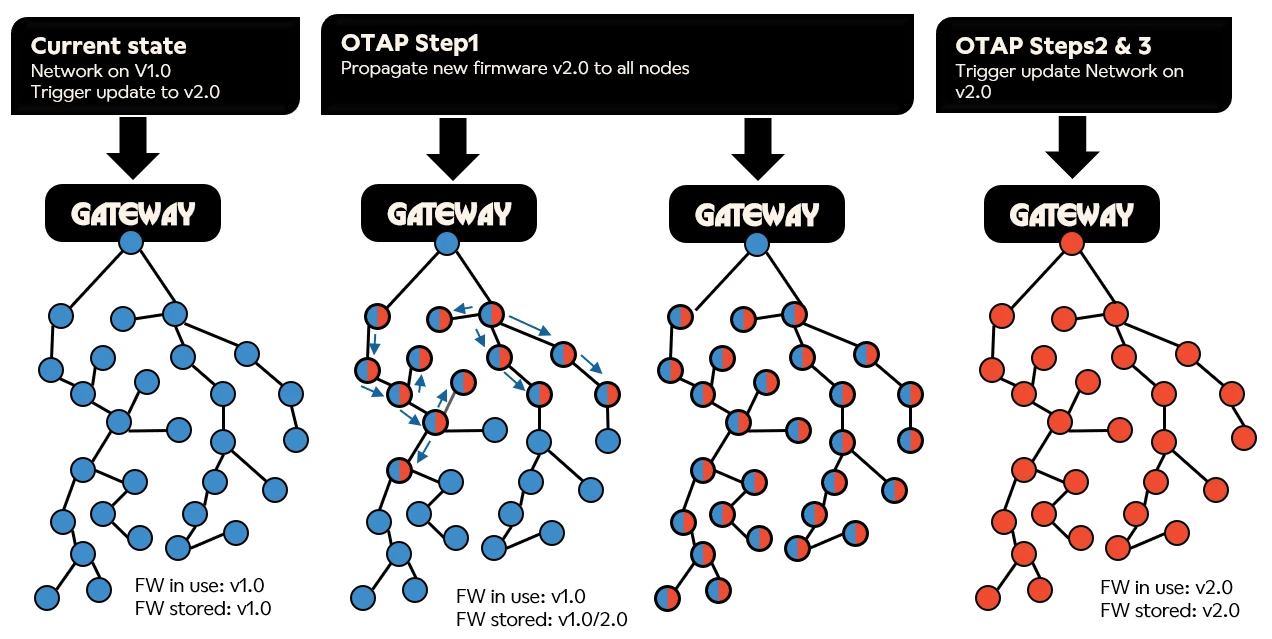
Step1 - Propagate
The first step of an OTAP starts by pushing a new Scratchpad to the Sink(s) (the Wirepas device in the Gateway) together with some parameters used to identify a newer version for the network.
Please note that in the below description we use versions e.g. v0.3 & 0.4 to identify software versions to be updated, only for a conceptual purpose. Other parameters are used to identify a newer scratchpad and are described in the next chapters.
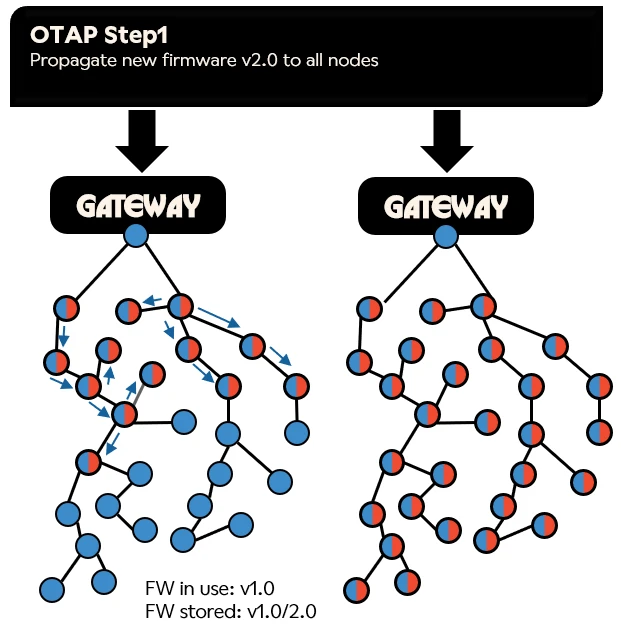
As soon as a newer Scratchpad is seen by a device and parameters are properly set in case of OTAPv2, the new image is automatically exchanged using an optimized peer-to-peer communication between devices and stored in the device's scratchpad memory (which can be either in internal or external flash).
This mechanism ensures that all devices will receive the new image when the image is present in the network.
At the end of the propagation process, all devices have a running version ie: v0.3 and a stored version ie: v0.4
A specific parameter called the Sequence Number is used by the devices to identify a newer version, as well as a CRC. The way this sequence number is controlled differ between OTAPv1 where there is an implicit definition and OTAPv2 where it is explicit.
Note: During this Scratchpad exchange the devices are temporary disconnected from the network.
Important note in case of OTAPv1: Even if in most of the cases the update is started from the Sink, any device with a newer version will automatically share his newer image to all devices in the network. This is very important to keep in mind in case of devices moving from one network to another one, as any device can bring an update to the network. This is not the case in OTAPv2.
Step2 - Trigger
During this phase the Backend (e.g. Wirepas Network Management System NMS [9]) is used to:
- Query the information from all devices via the Wirepas network to ensure they all have the proper Scratchpad in memory
- When all information is correct, trigger the OTAP by sending a command to all devices from all Gateways' sinks (via Remote API in case of OTAPv1 or Configuration Data Distribution mechanism in case of OTAPv2)
At the end of this step, all devices have the Scratchpad and are ready to process it.
Step3 - Process and apply the Update
This step is automatically triggered at the end of the Activation Delay set previously and will trigger the following actions:
- The device reboots and transfers execution to the Bootloader
- The Bootloader verifies the integrity of the scratchpad images
- The Bootloader checks if the scratchpad contains some valid binaries to be processed (checking Area ID)
- If yes, the Bootloader decrypts, decompresses, and writes the binary to the device’s flash, otherwise it just ignores the scratchpad and set it as processed.
- At the end of the process, the Bootloader reboots the device and the new version is executed.
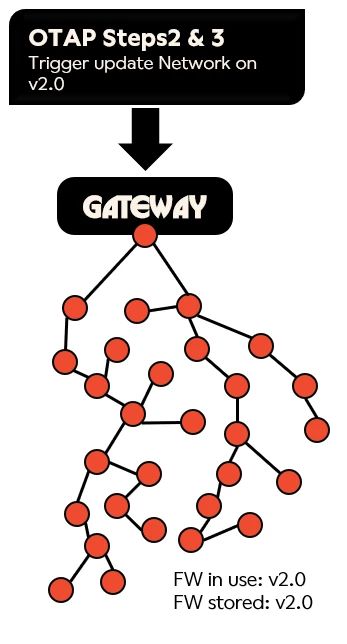
Note: The Wirepas OTAP does not include a fallback mechanism, ie once a version is successfully applied it can not come back to a previous one.
OTAP fail-safe (only in OTAP v1)
In addition to the previously described OTAP flow, a fail-safe mechanism is implemented. The fail-safe allows covering potential orphan devices to be updated in case they missed the update commands. For example, mobile devices, that might be outside of the network coverage when the process command is sent, are automatically updated after the safe period.
Key OTAP inputs parameters
In this section, the key parameters related to OTAP are described:
- The Scratchpad, which contains the image(s) to be updated
- The AreaID used to identify a firmware to update
- The Sequence number used to identify a newer scratchpad in the network
- CRC, automatically computed from the image(s)
Scratchpad
An OTAP Scratchpad is binary data that gets copied from one node to another. It is a collection of binaries transmitted via the OTAP mechanism. Each binary in a scratchpad has (among others) an IDentifier to define the targeted component to be updated. This identifier is called AreaID and corresponds to a specific area in Flash memory.
Area ID
Area ID can be defined for example as:
- Wirepas stack firmware AreaID (Stack AreaID): The Stack Area, specific for each chipset
- Wirepas bootloader
- Application Area ID (App Area ID): The Application Area
- User-defined Area ID, that can also be defined to store specific data related to the user application or system and which can be updated via the Wirepas OTAP mechanism.
Each binary part of the scratchpad is encrypted and the entire scratchpad integrity is guaranteed.
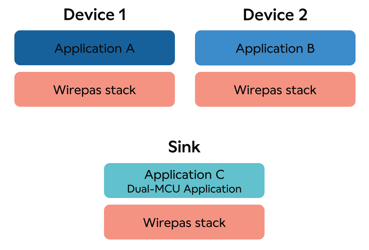
For example:
Area ID distinguishes different FW:
- Area ID X: Application A
- Area ID Y: Application B
- Area ID Z: Application C
- Area ID W: Wirepas stack
|
Stack Area ID
The Stack Area is used to store the Wirepas stack. The Area ID is always the same for all devices having the same chipset, as the stack is tightly linked to a given chipset.
The application Area ID and other User Area ID(s)
Each application or user area shall have a unique 32-bit AreaID that is stored in the device’s memory. Because this ID is used by the Bootloader to identify if a scratchpad update shall be applied or not, it shall be different for all different application firmware or user areas. The bootloader applies the update for any AreaID from the scratchpad matching the ones in the devices. The AreaID corresponding to the application is named AppAreaID.
Note: AreaID is defined during the device firmware build process. Hence they should be carefully selected as AreaID’s cannot be changed afterward.
The sequence number
A sequence number determines which OTAP scratchpad is the latest. The latest OTAP scratchpad gets copied between nodes until all nodes have the same scratchpad sequence number. The sequence number has 8 bits and the value is selected between 1-254.
Configuration Data Distribution (only in OTAPv2)
Configuration Data Distribution is an internal mechanism used in OTAPv2 to control the OTAP process. Thanks to this Wirepas Mesh stack feature it is possible to set a network wide OTAP action and configuration which nodes will use to propagate and process the OTAP.
Key components involved during OTAP
In this section, the key components involved during the OTAP process are listed:
- The Wirepas Stack
- The Bootloader
- The Wirepas Mesh remote API
- Wirepas Gateway drivers
- Wirepas Gateway to Backend API
Wirepas Stack
The Wirepas stack is responsible to spread a new scratchpad to the network. The Stack has the logic to:
- Advertise to the other devices its stored scratchpad information - Sequence number and CRC in OTAPv2
- Send or receive the scratchpad with neighbors if needed.
Note: The scratchpad is exchanged using direct peer-to-peer communication protocol between the sender and the receiver, allowing a fast transfer of the scratchpad. During this step, the nodes disconnect from the mesh network. That is why normal network operations are disrupted during the update process.
The Bootloader
The bootloader is responsible for processing the OTAP scratchpad. Whenever a new OTAP scratchpad is found in memory, the bootloader authenticates it and iterates through the OTAP files contained in the Scratchpad. If any of the data files have a matching AreaID, the bootloader erases the referenced memory areas and then writes file contents there.
There is no local interface for the bootloader. All interaction with the bootloader happens via data in program memory.
After iterating through all files in the scratchpad, the bootloader writes a status word in program memory to mark the scratchpad as processed. This prevents the bootloader from processing the scratchpad again when the node boots up. If there is an error, the status word will be written with an error code. In this case, the processing can be retried later.
Wirepas stack supports querying the bootloader status word locally (Single-MCU API [2]) or remotely(Remote API [3]), to know if the bootloader was able to process the scratchpad successfully.
The bootloader contains a set of AES-128 keys for authenticating and decrypting the OTAP scratchpad. These keys should be used when generating the scratchpad so that the device’s bootloader keys match with the scratchpad keys.
More details of the flash memory organization and bootloader can be found in Wirepas Mesh Flash structure and Bootloader application note [5]
The Wirepas Remote API
The Wirepas Remote API is used to interact with the device Wirepas Stack from the Gateways. The Remote API can be used to monitor the process, in OTAPv1 it also controls the OTAP process. More details on the Remote API concept can be found in Wirepas Software and APIs Overview document [4]
Wirepas Gateway drivers
The Wirepas Gateway drivers are responsible to receive and download a scratchpad to a Sink node via the Dual MCU API [4].
Wirepas Gateway to Backend API
The Wirepas Gateway to Backend API over MQTT is used to:
- Download scratchpad and set the sequence number to all gateways using the Gateway OTAP Module
- Send and receive commands to control and monitor the update process via Remote API
How to perform an OTAP
1. Build a Scratchpad
The first step is to generate a scratchpad. Scratchpads are automatically created during the SDK build process using a tool called genscratchpad.py. In order to get a proper scratchpad, the build has to be done using the correct AreaID and Bootloader keys to ensure the Scratchpad will be successfully applied to the devices in the network.
If you need more information about genscratchpad.py, or if a custom Scratchpad is needed (ex: with multiple application, custom data area), please refer to the document: How to generate a custom scratchpad with genscratchpad.py [8]
2. Perform the OTAP
OTAP can be performed by multiple means, either by using Wirepas NMS, Python library, or direct API calls.
2 documents are available to guide you through the OTAP process:
- How to perform OTAP with Wirepas v5.1 [6]: Describes the OTAPv2 flow available from Wirepas stack v5.1 onward (recommended)
- How to perform OTAP with Wirepas v5.0 [7]: Describes the OTAPv1 flow applicable to stack V5.0 and newer version in legacy mode.
Note: It is always recommended to test OTAP on a small network prior to deployment
Note: Please read Wirepas NMS OTAP section in its User Guide [10] to manage an OTAP process via NMS, and Release Notes' “Compatibility” section for supported firmware versions in NMS [11]
References
[1] Wirepas Mesh Concepts
[2] Wirepas Single MCU API (SDK Documentation)
[3] Wirepas Remote API Reference Manual
[4] Wirepas Software and APIs Overview
[5] Wirepas Flash structure and Bootloader application note
[6] How to perform OTAP with Wirepas v5.1
[7] How to perform OTAP with Wirepas v5.0
[8] How to generate a custom scratchpad with genscratchpad.py
[9] Wirepas NMS System Overview
[10] Wirepas NMS OTAP
[11] Wirepas NMS
Revision History
| Date | Version | Notes |
v1.0 | Initial version. | |
v1.2 | Updated with support of OTAPv2 | |
v1.3 | Replace WNT with NMS as backend component |
Legal Notice
Use of this document is strictly subject to Wirepas’ Terms of Use and Legal Notice.
Copyright © 2026 Wirepas Oy